curl -X 'POST' \
  'https://api.docugenerate.com/v1/document' \
  -H 'Accept: application/json' \
  -H 'Authorization: YOUR_API_KEY' \
  -H 'Content-Type: application/json' \
  -d '{
  "template_id": "YOUR_TEMPLATE_ID",
  "output_format": ".pdf",
  "single_file": false,
  "output_name": "Asset Tag [asset_id]",
  "data": [
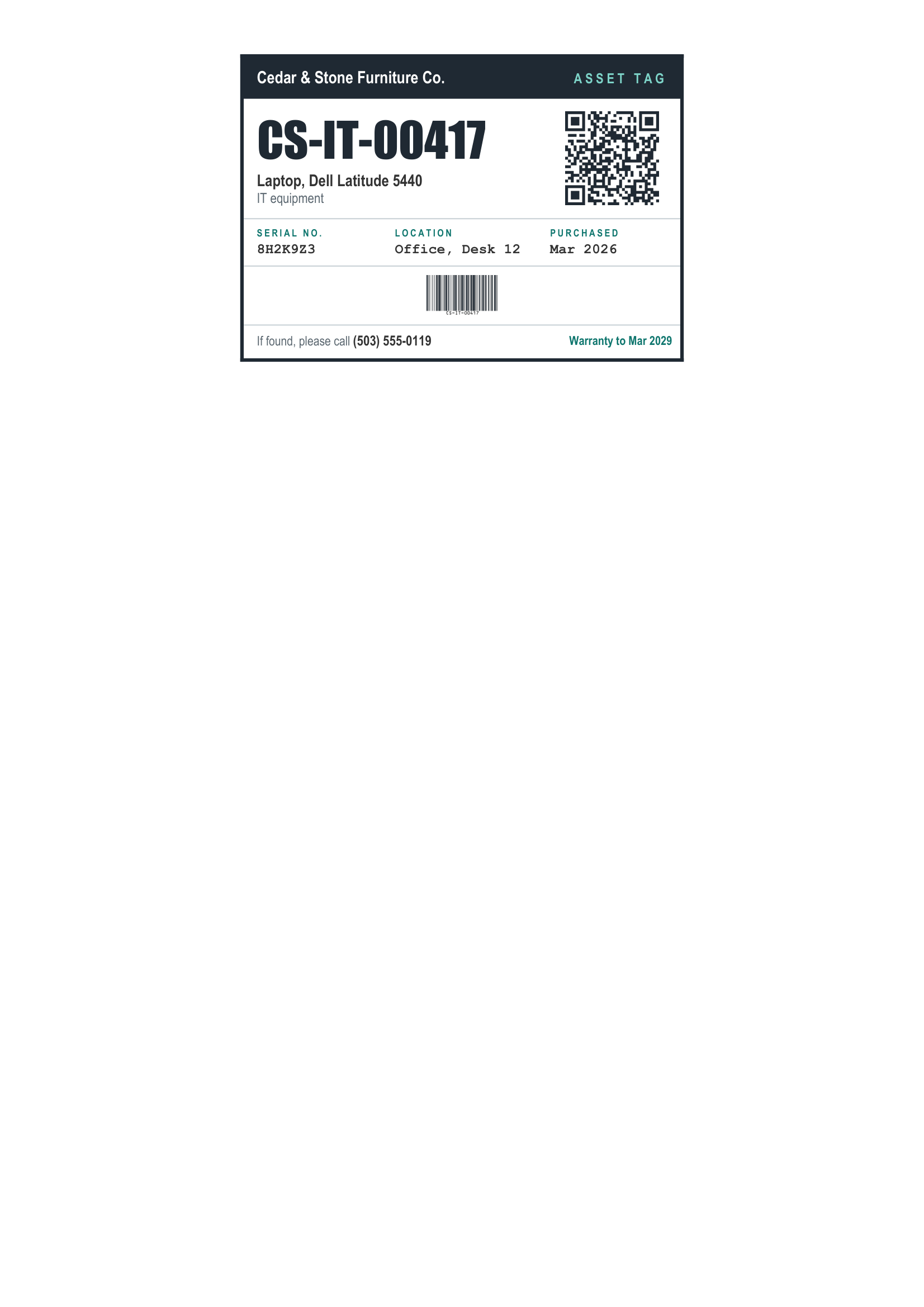
    { "company_name": "Cedar & Stone Furniture Co.", "asset_id": "CS-IT-00417", "asset_name": "Laptop, Dell Latitude 5440", "category": "IT equipment", "serial_number": "8H2K9Z3", "location": "Office, Desk 12", "purchase_date": "Mar 2026", "contact_phone": "(503) 555-0119", "asset_url": "https://assets.cedarandstone.example/CS-IT-00417", "warranty_until": "Mar 2029", "has_warranty": true },
    { "company_name": "Cedar & Stone Furniture Co.", "asset_id": "CS-IT-00418", "asset_name": "Laptop, Dell Latitude 5440", "category": "IT equipment", "serial_number": "8H2K9Z4", "location": "Office, Desk 13", "purchase_date": "Mar 2026", "contact_phone": "(503) 555-0119", "asset_url": "https://assets.cedarandstone.example/CS-IT-00418", "warranty_until": "Mar 2029", "has_warranty": true },
    { "company_name": "Cedar & Stone Furniture Co.", "asset_id": "CS-IT-00431", "asset_name": "Monitor, LG UltraFine 27 in", "category": "IT equipment", "serial_number": "402NTXR1", "location": "Office, Desk 12", "purchase_date": "Jun 2025", "contact_phone": "(503) 555-0119", "asset_url": "https://assets.cedarandstone.example/CS-IT-00431", "warranty_until": "Jun 2028", "has_warranty": true },
    { "company_name": "Cedar & Stone Furniture Co.", "asset_id": "CS-WS-00102", "asset_name": "CNC router, Biesse Rover A", "category": "Workshop machinery", "serial_number": "BR-2203-5581", "location": "Workshop, Bay 1", "purchase_date": "Aug 2022", "contact_phone": "(503) 555-0119", "asset_url": "https://assets.cedarandstone.example/CS-WS-00102", "warranty_until": "", "has_warranty": false },
    { "company_name": "Cedar & Stone Furniture Co.", "asset_id": "CS-WS-00117", "asset_name": "Panel saw, Felder K 700 S", "category": "Workshop machinery", "serial_number": "FK-7001-4417", "location": "Workshop, Bay 2", "purchase_date": "Jan 2024", "contact_phone": "(503) 555-0119", "asset_url": "https://assets.cedarandstone.example/CS-WS-00117", "warranty_until": "Jan 2027", "has_warranty": true },
    { "company_name": "Cedar & Stone Furniture Co.", "asset_id": "CS-WS-00124", "asset_name": "Dust extractor, Festool CT 36", "category": "Workshop tools", "serial_number": "CT36-90713", "location": "Workshop, Bay 2", "purchase_date": "Apr 2025", "contact_phone": "(503) 555-0119", "asset_url": "https://assets.cedarandstone.example/CS-WS-00124", "warranty_until": "Apr 2028", "has_warranty": true },
    { "company_name": "Cedar & Stone Furniture Co.", "asset_id": "CS-FL-00021", "asset_name": "Forklift, Toyota 8FGU25", "category": "Vehicles and lifting", "serial_number": "TY-8F-33201", "location": "Warehouse, Dock B", "purchase_date": "Nov 2021", "contact_phone": "(503) 555-0119", "asset_url": "https://assets.cedarandstone.example/CS-FL-00021", "warranty_until": "", "has_warranty": false },
    { "company_name": "Cedar & Stone Furniture Co.", "asset_id": "CS-FA-00305", "asset_name": "Conference table, solid oak", "category": "Furniture", "serial_number": "CT-OAK-0112", "location": "Office, Meeting room 2", "purchase_date": "Feb 2023", "contact_phone": "(503) 555-0119", "asset_url": "https://assets.cedarandstone.example/CS-FA-00305", "warranty_until": "", "has_warranty": false },
    { "company_name": "Cedar & Stone Furniture Co.", "asset_id": "CS-IT-00452", "asset_name": "Network printer, HP LaserJet M507", "category": "IT equipment", "serial_number": "PHBBL2R03T", "location": "Office, Print room", "purchase_date": "Sep 2025", "contact_phone": "(503) 555-0119", "asset_url": "https://assets.cedarandstone.example/CS-IT-00452", "warranty_until": "Sep 2028", "has_warranty": true },
    { "company_name": "Cedar & Stone Furniture Co.", "asset_id": "CS-SF-00009", "asset_name": "First aid station, wall mounted", "category": "Safety equipment", "serial_number": "SF-FA-0009", "location": "Workshop, Entrance", "purchase_date": "Jan 2026", "contact_phone": "(503) 555-0119", "asset_url": "https://assets.cedarandstone.example/CS-SF-00009", "warranty_until": "", "has_warranty": false }
  ]
}'