DocuGenerate handles the technical packaging required by e-invoicing standards such as Factur-X and XRechnung automatically. Once you attach a compliant XML file to a generated PDF, DocuGenerate detects it and adds the metadata required by the standard, without any additional parameters or setup on your end.
How Detection Works
DocuGenerate looks for specific tags that identify the XML file as a UN/CEFACT Cross Industry Invoice (CII) document, the structure used by Factur-X, ZUGFeRD 2.1+, and XRechnung. When these tags are present, the guideline identifier embedded in the XML is used to determine the conformance profile. The supported profiles are:
| Profile | Description |
|---|---|
MINIMUM | Contains only the minimal accounting data required for VAT purposes. |
BASIC WL | Adds header level information on top of MINIMUM, without invoice line items. |
BASIC | Includes full invoice line items, following a subset of the EN 16931 model. |
EN 16931 | Fully compliant with the EN 16931 European e-invoicing standard. |
EXTENDED | Supports complex business processes with additional data beyond EN 16931. |
XRECHNUNG | The German reference profile for invoices sent to public administrations. |
This only applies to XML files that follow one of these standards, while other attachments are handled as regular files.
Adding XMP Metadata
The following XMP tags are written into the generated PDF’s metadata, along with the corresponding PDF/A Extension Schema declaration:
| Tag | Description |
|---|---|
fx:DocumentType | The type of document. Always INVOICE. |
fx:DocumentFileName | The name of the attached XML file, such as factur-x.xml. |
fx:Version | The version of the schema used by the attached XML file. |
fx:ConformanceLevel | The detected profile, such as MINIMUM, BASIC WL, BASIC, EN 16931, EXTENDED or XRECHNUNG. |
Here’s an example of the XMP tags that are added to a PDF’s metadata for an XML file with the MINIMUM profile:
<rdf:Description rdf:about="" xmlns:fx="urn:factur-x:pdfa:CrossIndustryDocument:invoice:1p0#">
  <fx:DocumentType>INVOICE</fx:DocumentType>
  <fx:DocumentFileName>factur-x.xml</fx:DocumentFileName>
  <fx:Version>1.0</fx:Version>
  <fx:ConformanceLevel>MINIMUM</fx:ConformanceLevel>
</rdf:Description>
File Naming
The Factur-X and ZUGFeRD standards require the embedded XML file to use a specific name depending on the profile: factur-x.xml for most profiles, and xrechnung.xml for the XRECHNUNG profile. If you specify a file name, it is used as provided. If you attach the file as a data URI without a name property, DocuGenerate automatically assigns the correct filename once the profile has been detected.
File Relationship
Each attached file is also assigned the PDF/A-3 AFRelationship value that best matches its role. For the MINIMUM and BASIC WL profiles, this is set to Data, since the PDF typically contains more information than the structured file. For the other profiles, the XML file attached under its official name is set to Alternative, indicating that the PDF and the XML represent the same invoice content.
Example
Attach your Factur-X or XRechnung XML file the same way you would attach any other file, using the .pdf/a-3b output format:
curl -X 'POST' \
  'https://api.docugenerate.com/v1/document' \
  -H 'accept: application/json' \
  -H 'Authorization: 491c000c5fad32ed7787005b0723ad55' \
  -H 'Content-Type: multipart/form-data' \
  -F 'template_id=7VYocxLnIupLU3YT4iLr' \
  -F 'attach="data:text/xml;name=factur-x.xml;base64,77u/PD94bWwgdmVyc2lvbj0nMS4wJyBlbmNvZGluZz0nVVRGLTgnPz4KPHJzbTpDcm9zc0luZHVzdHJ5SW52b2ljZSB4bWxuczpxZHQ9InVybjp1bjp1bmVjZTp1bmNlZmFjdDpkYXRhOnN0YW5kYXJkOlF1YWxpZmllZERhdGFUeXBlOjEwMCIKeG1sbnM6cmFtPSJ1cm46dW46dW5lY2U6dW5jZWZhY3Q6ZGF0YTpzdGFuZGFyZDpSZXVzYWJsZUFnZ3JlZ2F0ZUJ1c2luZXNzSW5mb3JtYXRpb25FbnRpdHk6MTAwIgp4bWxuczpyc209InVybjp1bjp1bmVjZTp1bmNlZmFjdDpkYXRhOnN0YW5kYXJkOkNyb3NzSW5kdXN0cnlJbnZvaWNlOjEwMCIKeG1sbnM6dWR0PSJ1cm46dW46dW5lY2U6dW5jZWZhY3Q6ZGF0YTpzdGFuZGFyZDpVbnF1YWxpZmllZERhdGFUeXBlOjEwMCIKeG1sbnM6eHNpPSJodHRwOi8vd3d3LnczLm9yZy8yMDAxL1hNTFNjaGVtYS1pbnN0YW5jZSI+CiAgICAgPHJzbTpFeGNoYW5nZWREb2N1bWVudENvbnRleHQ+CiAgICAgICAgICA8cmFtOkJ1c2luZXNzUHJvY2Vzc1NwZWNpZmllZERvY3VtZW50Q29udGV4dFBhcmFtZXRlcj4KICAgICAgICAgICAgICAgPHJhbTpJRD5TMTwvcmFtOklEPgogICAgICAgICAgPC9yYW06QnVzaW5lc3NQcm9jZXNzU3BlY2lmaWVkRG9jdW1lbnRDb250ZXh0UGFyYW1ldGVyPgogICAgICAgICAgPHJhbTpHdWlkZWxpbmVTcGVjaWZpZWREb2N1bWVudENvbnRleHRQYXJhbWV0ZXI+CiAgICAgICAgICAgICAgIDxyYW06SUQ+dXJuOmZhY3R1ci14LmV1OjFwMDptaW5pbXVtPC9yYW06SUQ+CiAgICAgICAgICA8L3JhbTpHdWlkZWxpbmVTcGVjaWZpZWREb2N1bWVudENvbnRleHRQYXJhbWV0ZXI+CiAgICAgPC9yc206RXhjaGFuZ2VkRG9jdW1lbnRDb250ZXh0PgogICAgIDxyc206RXhjaGFuZ2VkRG9jdW1lbnQ+CiAgICAgICAgICA8cmFtOklEPkYyMDI2MDAyMzwvcmFtOklEPgogICAgICAgICAgPHJhbTpUeXBlQ29kZT4zODA8L3JhbTpUeXBlQ29kZT4KICAgICAgICAgIDxyYW06SXNzdWVEYXRlVGltZT4KICAgICAgICAgICAgICAgPHVkdDpEYXRlVGltZVN0cmluZyBmb3JtYXQ9IjEwMiI+MjAyNjAxMzE8L3VkdDpEYXRlVGltZVN0cmluZz4KICAgICAgICAgIDwvcmFtOklzc3VlRGF0ZVRpbWU+CiAgICAgPC9yc206RXhjaGFuZ2VkRG9jdW1lbnQ+CiAgICAgPHJzbTpTdXBwbHlDaGFpblRyYWRlVHJhbnNhY3Rpb24+CiAgICAgICAgICA8cmFtOkFwcGxpY2FibGVIZWFkZXJUcmFkZUFncmVlbWVudD4KICAgICAgICAgICAgICAgPHJhbTpCdXllclJlZmVyZW5jZT5TRVJWRVhFQzwvcmFtOkJ1eWVyUmVmZXJlbmNlPgogICAgICAgICAgICAgICA8cmFtOlNlbGxlclRyYWRlUGFydHk+CiAgICAgICAgICAgICAgICAgICAgPHJhbTpOYW1lPkNvbXBhbnkgSW5jLjwvcmFtOk5hbWU+CiAgICAgICAgICAgICAgICAgICAgPHJhbTpTcGVjaWZpZWRMZWdhbE9yZ2FuaXphdGlvbj4KICAgICAgICAgICAgICAgICAgICAgICAgIDxyYW06SUQgc2NoZW1lSUQ9IjAwMDIiPjEyMzQ1Njc4MjwvcmFtOklEPgogICAgICAgICAgICAgICAgICAgIDwvcmFtOlNwZWNpZmllZExlZ2FsT3JnYW5pemF0aW9uPgogICAgICAgICAgICAgICAgICAgIDxyYW06UG9zdGFsVHJhZGVBZGRyZXNzPgogICAgICAgICAgICAgICAgICAgICAgICAgPHJhbTpDb3VudHJ5SUQ+RlI8L3JhbTpDb3VudHJ5SUQ+CiAgICAgICAgICAgICAgICAgICAgPC9yYW06UG9zdGFsVHJhZGVBZGRyZXNzPgogICAgICAgICAgICAgICAgICAgIDxyYW06U3BlY2lmaWVkVGF4UmVnaXN0cmF0aW9uPgogICAgICAgICAgICAgICAgICAgICAgICAgPHJhbTpJRCBzY2hlbWVJRD0iVkEiPkZSMTExMjM0NTY3ODI8L3JhbTpJRD4KICAgICAgICAgICAgICAgICAgICA8L3JhbTpTcGVjaWZpZWRUYXhSZWdpc3RyYXRpb24+CiAgICAgICAgICAgICAgIDwvcmFtOlNlbGxlclRyYWRlUGFydHk+CiAgICAgICAgICAgICAgIDxyYW06QnV5ZXJUcmFkZVBhcnR5PgogICAgICAgICAgICAgICAgICAgIDxyYW06TmFtZT5BY21lIENvcnA8L3JhbTpOYW1lPgogICAgICAgICAgICAgICAgICAgIDxyYW06U3BlY2lmaWVkTGVnYWxPcmdhbml6YXRpb24+CiAgICAgICAgICAgICAgICAgICAgICAgICA8cmFtOklEIHNjaGVtZUlEPSIwMDAyIj45ODc2NTQzMjE8L3JhbTpJRD4KICAgICAgICAgICAgICAgICAgICA8L3JhbTpTcGVjaWZpZWRMZWdhbE9yZ2FuaXphdGlvbj4KICAgICAgICAgICAgICAgPC9yYW06QnV5ZXJUcmFkZVBhcnR5PgogICAgICAgICAgICAgICA8cmFtOkJ1eWVyT3JkZXJSZWZlcmVuY2VkRG9jdW1lbnQ+CiAgICAgICAgICAgICAgICAgICAgPHJhbTpJc3N1ZXJBc3NpZ25lZElEPlBPMjAxOTI1NDc4PC9yYW06SXNzdWVyQXNzaWduZWRJRD4KICAgICAgICAgICAgICAgPC9yYW06QnV5ZXJPcmRlclJlZmVyZW5jZWREb2N1bWVudD4KICAgICAgICAgIDwvcmFtOkFwcGxpY2FibGVIZWFkZXJUcmFkZUFncmVlbWVudD4KPHJhbTpBcHBsaWNhYmxlSGVhZGVyVHJhZGVEZWxpdmVyeS8+CiAgICAgICAgICA8cmFtOkFwcGxpY2FibGVIZWFkZXJUcmFkZVNldHRsZW1lbnQ+CiAgICAgICAgICAgICAgIDxyYW06SW52b2ljZUN1cnJlbmN5Q29kZT5FVVI8L3JhbTpJbnZvaWNlQ3VycmVuY3lDb2RlPgogICAgICAgICAgICAgICA8cmFtOlNwZWNpZmllZFRyYWRlU2V0dGxlbWVudEhlYWRlck1vbmV0YXJ5U3VtbWF0aW9uPgogICAgICAgICAgICAgICAgICAgIDxyYW06VGF4QmFzaXNUb3RhbEFtb3VudD4xNTAwLjAwPC9yYW06VGF4QmFzaXNUb3RhbEFtb3VudD4KICAgICAgICAgICAgICAgICAgICA8cmFtOlRheFRvdGFsQW1vdW50IGN1cnJlbmN5SUQ9IkVVUiI+MC4wMDwvcmFtOlRheFRvdGFsQW1vdW50PgogICAgICAgICAgICAgICAgICAgIDxyYW06R3JhbmRUb3RhbEFtb3VudD4xNTAwLjAwPC9yYW06R3JhbmRUb3RhbEFtb3VudD4KICAgICAgICAgICAgICAgICAgICA8cmFtOkR1ZVBheWFibGVBbW91bnQ+MTUwMC4wMDwvcmFtOkR1ZVBheWFibGVBbW91bnQ+CiAgICAgICAgICAgICAgIDwvcmFtOlNwZWNpZmllZFRyYWRlU2V0dGxlbWVudEhlYWRlck1vbmV0YXJ5U3VtbWF0aW9uPgogICAgICAgICAgPC9yYW06QXBwbGljYWJsZUhlYWRlclRyYWRlU2V0dGxlbWVudD4KICAgICA8L3JzbTpTdXBwbHlDaGFpblRyYWRlVHJhbnNhY3Rpb24+CjwvcnNtOkNyb3NzSW5kdXN0cnlJbnZvaWNlPg=="' \
  -F 'data={ "Company Name": "Acme Corp", "Invoice No": "INV-123456", "Street Address": "123 Main St", "City": "Springfield", "State": "IL", "Zip Code": "62701", "Invoice Date": "2025-02-26", "Phone": "(555) 123-4567", "Description": "Consulting services for Q1 2025", "Quantity": "10", "Amount": "150.00", "Total": "1500.00" }' \
  -F 'output_format=.pdf/a-3b'
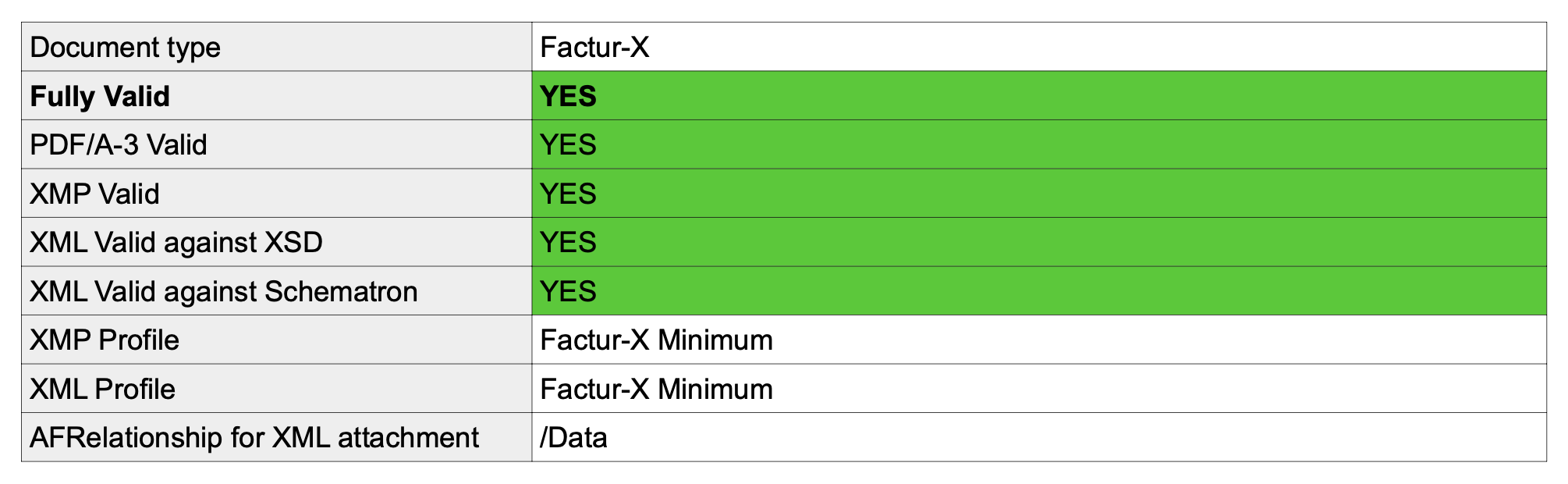
The resulting PDF contains both the visual invoice and the embedded XML file, with the metadata already in place. It successfully passes the validation on a third-party service:
Limitations
DocuGenerate does not generate or validate the content of the XML file itself. You are responsible for providing an XML file that is compliant with the XSD schema and Schematron rules of your chosen standard. DocuGenerate only handles the PDF/A-3 packaging and the metadata that describes the attached file, not the data inside it.
For a complete, step by step tutorial covering template creation, XML preparation, and PDF generation, see How to Create ZUGFeRD / Factur-X PDF Invoices with DocuGenerate.